What Customers See When They Look You Up
By
Darren DeYoung
If your phone is slow in busy season, the fastest way to find out why is to look yourself up the way a homeowner does. Grab a phone that is signed out of Google, search your company name, open your site, then search the job you want in your towns. It takes ten minutes and shows you where calls leak.
Busy season is on the calendar, but the phone hasn't caught up. The crews are ready, the trucks are loaded, and the week still has holes in it. Meanwhile a company that opened a few years ago seems to show up everywhere you look.
Most owners in that spot have a hunch about the website or the reviews. You can't fix a hunch, though. This is a diagnosis, not a roast. You aren't grading how the site makes you feel. You're writing down what a stranger sees before they decide whether to call you or the next name on the list.
How do I search my business on Google the way a customer would?
Use a phone, not a laptop, and sign out of Google or open a private tab so your own history doesn't shape the results. Better yet, borrow a phone from someone who doesn't work for you. Keep paper handy, because the last step compares your notes against the companies that show up.
A phone matters because people searching "tree removal near me" are often standing in the yard looking at the tree. Signed out matters because you've visited your own site a hundred times, and you want the stranger's version.
What do customers see when they Google my company name?
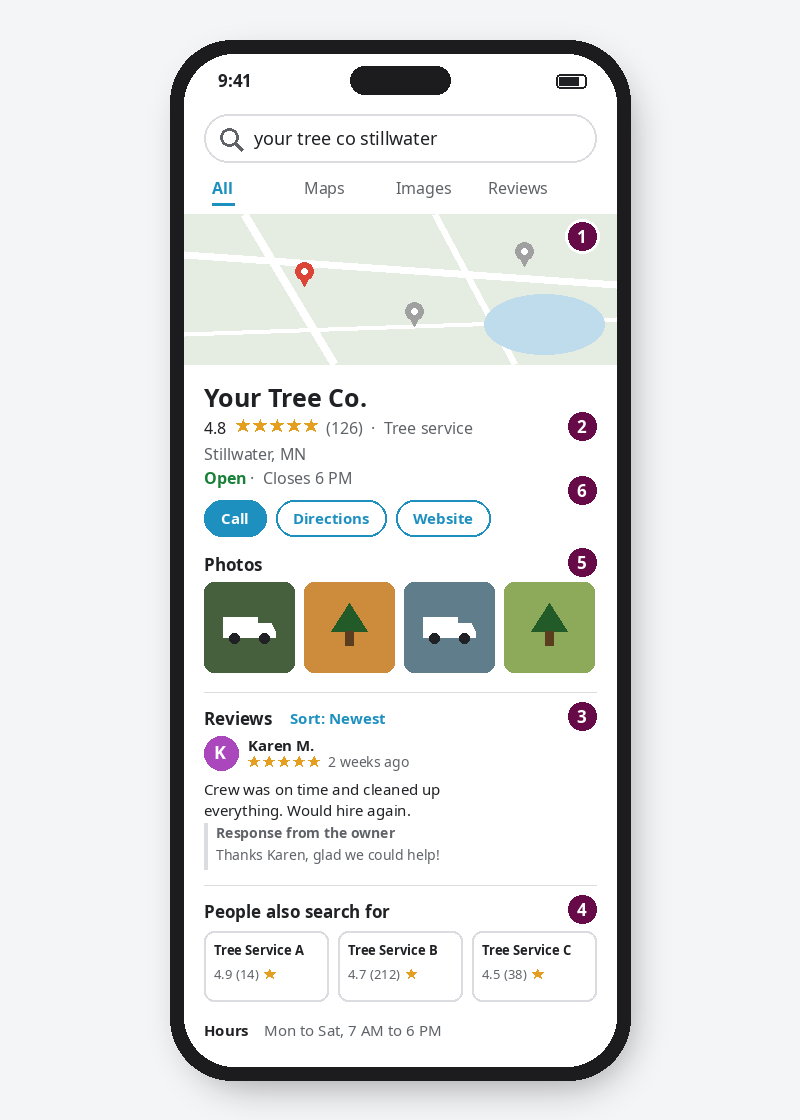
When someone searches your name, they should find your Google Business Profile with current reviews, real photos, and a phone number someone answers. Write down whether it shows, your star rating, review count, newest review date, the other companies on the screen, and whether your photos look like your trucks and crew.
Type your name the way customers say it. If people call you "Jim's Tree" and not "Hoffman Arboricultural Services LLC," search that. Then write down:
- Does your Business Profile show up? On a phone it's usually a full listing near the top or a spot in the map pack (the box with a map and a short list of businesses). If another company appears in that map when you searched your own name, write their name.
- Your star rating and review count, exactly as shown. A 4.9 with 9 reviews and a 4.6 with 140 reviews tell a homeowner two different stories.
- The date of your newest review. Sort by newest. If the latest one is from last spring, a homeowner may wonder if you're still busy, or still around. Note whether you replied to it.
- The other companies on the screen. Write down three names that appear near yours, in the map, the ads, or "People also search for." These are the companies a homeowner is comparing you to. They may not be the ones you think of as your competition.
- Your photos. Do they look like your trucks, your crew, and your finished jobs? Or a stock photo of a smiling family? You're asking someone to let you into their yard or their living room. They want to see who's coming.
- Your hours and phone number. Are they right? Is that the number someone actually answers?
Does my website work on a phone when a customer is ready to call?
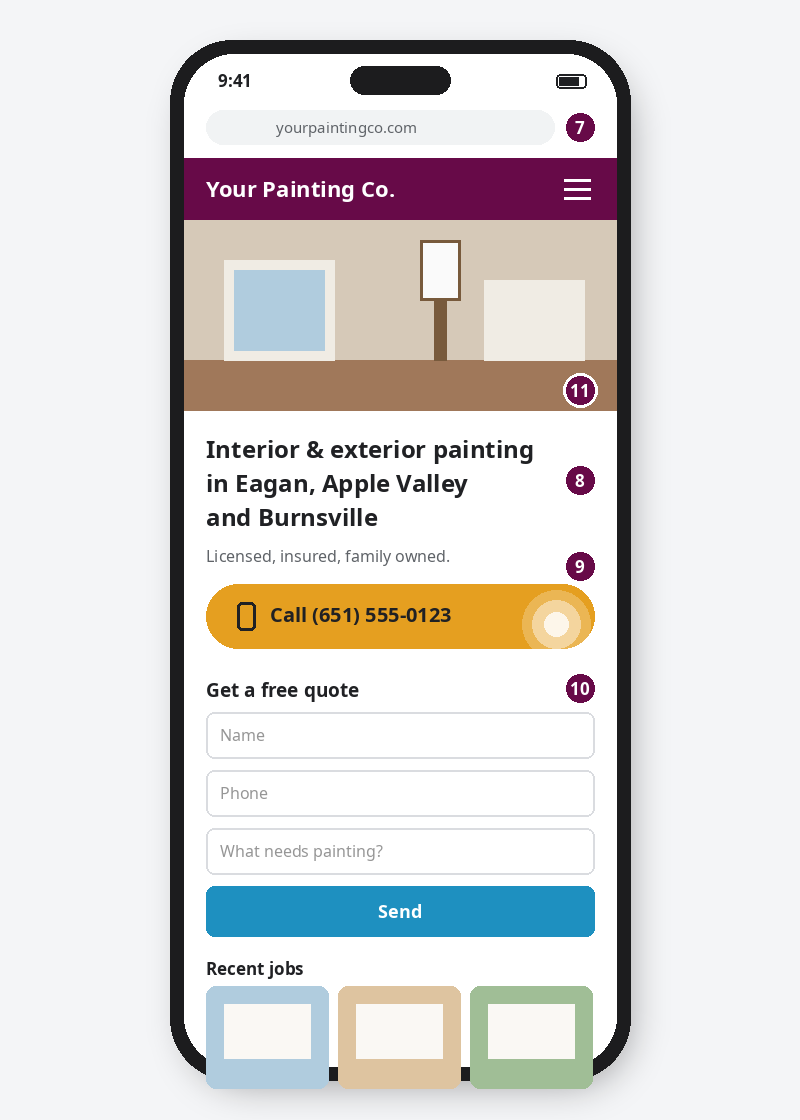
Your site passes the phone test if it loads without testing your patience, says what you do and where without scrolling, has a phone number that opens the dialer when tapped, and has a quote form that actually reaches someone. Tap through from Google and try each one yourself, the way a customer would.
- Did you get impatient waiting for it to load? No stopwatch needed. Just be honest.
- Can you tell what you do and where, without scrolling? "Tree removal and trimming in Woodbury, Stillwater and Hudson" tells a homeowner they're in the right place. "Quality. Integrity. Service." does not.
- Is the phone number tappable? Tap it. Did the dialer open? If the number is part of an image or buried at the bottom of the page, write that down. It's a small thing that quietly costs calls, and it's usually a quick fix.
- Does the quote form work with a thumb? Fill out your own form. Did it go through? Did the email land in an inbox someone checks? Go look.
- Do the photos on the site look like your work? Same test as your Google photos.
Who shows up when customers search "tree removal" or "interior painter" in my towns?
A homeowner who hasn't heard of you can't search your name. They search the job and the town, like "tree removal Stillwater MN." Run two or three of those searches for the work you want more of. Note where you appear, who appears instead, and what the company that keeps showing up has that you don't.
Try a few that match your business: "Interior painter Eagan." "Garage door repair Maple Grove." "Landscaper Woodbury."
- Where do you show up? In the map pack, in the regular results below it, or not at all?
- Who shows up instead? Compare them to the three names from your company-name search. If one company keeps appearing, write down what they have that you don't: newer reviews, photos of real jobs, a page about that exact service, a page about that town.
- Tap the top competitor and run the phone test on their site. Is their number tappable? Is it obvious what they do and where?
Why does a newer competitor show up ahead of my company on Google?
Years in business don't show up in a search result, so the homeowner scrolling doesn't see them. What they do see is reviews, photos, and a page that matches what they typed. If a newer competitor has fresher reviews, real job photos, or a page for that exact service and town, that's usually the gap.
Is it my website, my reviews, or my Google listing? How to read your notes
Sort every note into one of three leaks. Not found means you're missing for your main service in your own towns. Found but passed over means you show up but lose on reviews, photos, or a clear offer. Clicked but no call means the site lost them. Fix the leak closest to the phone first.
Most owners find a little of each. Fixing "clicked but no call" helps people already choosing you, so it often pays off first.
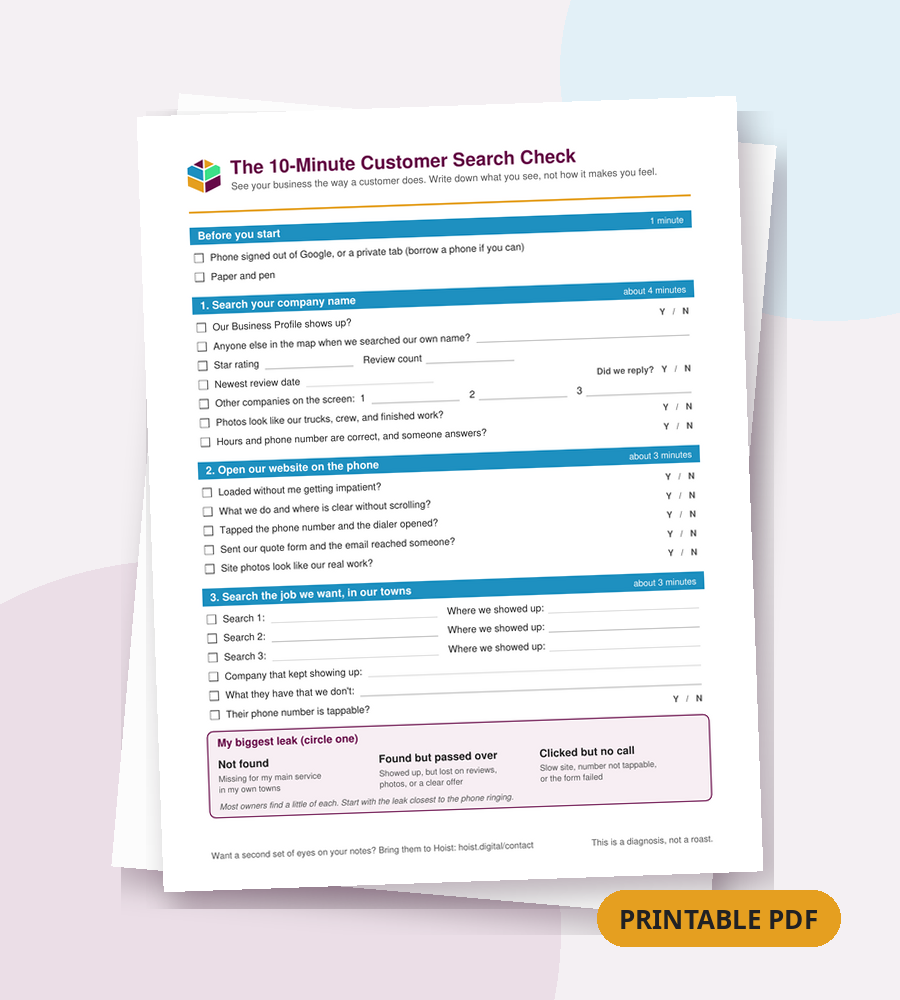
Printable checklist: the 10-minute customer search check
Print this one-page checklist and fill it in as you go. It follows the same three steps: search your company name, test your site on a phone, then search the job you want in your towns. Circle your biggest leak at the bottom.
Download the printable checklist (PDF)
Setup
- ☐ Phone, signed out of Google or in a private tab
- ☐ Paper and pen
Search your company name
- ☐ Business Profile shows up? (Y / N) Anyone else in the map? ________
- ☐ Star rating ____ Review count ____
- ☐ Newest review date ________ Did we reply? (Y / N)
- ☐ Three other companies on the screen: ________ / ________ / ________
- ☐ Photos look like our trucks, crew, and work? (Y / N)
- ☐ Hours and phone number correct? (Y / N)
Our website on the phone
- ☐ Loaded without me getting impatient? (Y / N)
- ☐ What we do and where is clear without scrolling? (Y / N)
- ☐ Phone number is tappable? (Y / N)
- ☐ Quote form submitted and the email arrived? (Y / N)
- ☐ Site photos look like our real work? (Y / N)
Search the job we want, in our towns
- ☐ Search 1: ____________ Where we showed up: ________
- ☐ Search 2: ____________ Where we showed up: ________
- ☐ Search 3: ____________ Where we showed up: ________
- ☐ Company that kept showing up: ________
- ☐ What they have that we don't: ________
- ☐ Their phone number tappable? (Y / N)
My biggest leak (circle one): Not found / Found but passed over / Clicked but no call
What should I do after the walkthrough?
Bring your notes to someone who can check them against the same searches and tell you which leak to fix first. That's what a call with Hoist is. We'll run the searches, walk through what we see, and explain our reasoning. We won't promise a ranking jump, because nobody honest can.
Some fixes, like a tappable number or a reply to that last review, you can do this week on your own. Go for it. If the list is longer, that's a good time to talk. You'll leave knowing what to fix, whether you hire us or not.